Cetris
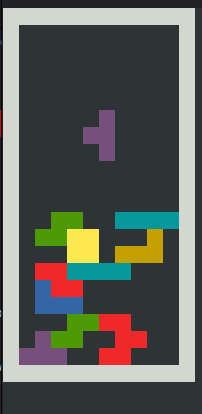
The Project
This Cetris project
(Tetris in C) is an old project of mine,
from a time when I was learning how to use make for the first
time, and compile a C project that is composed of multiple .h
and .c files. I got introduced to many interesting problems
while working on this project. And bear in mind, that was a time
when LLMs hadn’t been invented yet. I remember looking the net for
Tetris versions, and trying to decide which rotation logic should
I use, and which pieces should be on the board. From the project
README.md:
“Piece rotation follows the Super Rotation System (SRS), and pieces are drawn from a 7-bag randomiser that guarantees every piece type appears once before any repeat.”
The Color Problem
One of the main obstacles I faced was colors, that’s why I specifically
specified that THIS TETRIS CLONE HAS COLORS in the project README.md.
Now you may say, okay, your clone has colors, but basically all terminal Tetris clones have
colors. It is not something special. Surely, that is right. You are
just going to use ANSI escape sequences,
and display the pieces in the color you want, correct? Not actually. You see,
not all terminals support 8-bit colors,
and the terminal that I was working on at the time only supported
8 different colors.
I could have chosen a terminal that supported more colors, but for some
reason, I didn’t, and tried to find a way to fit more colors in the
8 colors range. Now you might be thinking, that the original Tetris had
only 7 tetrominoes, and 8 colors
was enough. But after removing white (for borders) and black (for background),
I was only left with 6 colors, not enough to make a fully colored Tetris clone.
So, I started experimenting with the ANSI codes. Tried different combinations, styles, but actually I was not that optimistic about it. You see, the color limit seemed like a hard limit, and I was running out of things to try. I was truly thinking of installing a terminal that supports more colors, or instead even turning the whole thing monochrome.
The Solution
Then, I found it: The ANSI code (or option, specifically) that really let me double the color space! You see, when you bold a character, it actually changes color a little bit. If it was red, it gets a brighter, more intense shade. But my tetrominoes consisted of background-colored blocks, and as far as I can tell, you were not able to bold backgrounds directly.
However, there is a neat trick: you can reverse the foreground and background
colors using a single ANSI parameter
(n=7 for reverse, n=1 for bold). By swapping foreground and background, the
block’s visual color now comes from the foreground, which can be bolded.
This means the same base color (say, COLOR_YELLOW) could render as two
perceptually distinct shades: normal yellow (Orange) and bold+reversed yellow
(a brighter Yellow). Suddenly, 8 color limit became 16 effective colors, enough
to color all 7 tetrominoes plus the board border!
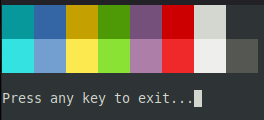
To visualise the trick, here is a small standalone program that prints all 8 effective
colors in an 8×2 grid: The first row shows the plain bg variant, and the second row
shows the bold+reverse variant of the same base color. Install libncurses-dev and
compile with -lncurses flag:
#include <ncurses.h>

// Pair index, base color,
// bold+reverse flag
static const struct {
    int       pair;
    int       fg;
    int       bold_reverse;
} COLORS_8x2[16] = {
    /* row 0: plain bg */
    { 1, COLOR_CYAN,    0 },
    { 2, COLOR_BLUE,    0 },
    { 3, COLOR_YELLOW,  0 },
    { 4, COLOR_GREEN,   0 },
    { 5, COLOR_MAGENTA, 0 },
    { 6, COLOR_RED,     0 },
    { 7, COLOR_WHITE,   0 },
    { 8, COLOR_BLACK,   0 },
    /* row 1: bold+reverse */
    { 1, COLOR_CYAN,    1 },
    { 2, COLOR_BLUE,    1 },
    { 3, COLOR_YELLOW,  1 },
    { 4, COLOR_GREEN,   1 },
    { 5, COLOR_MAGENTA, 1 },
    { 6, COLOR_RED,     1 },
    { 7, COLOR_WHITE,   1 },
    { 8, COLOR_BLACK,   1 },
};

int main(void)
{
    initscr();
    start_color();
    cbreak();
    noecho();

    // Initialise all 8 base pairs (same fg and bg)
    init_pair(1, COLOR_CYAN,    COLOR_CYAN);
    init_pair(2, COLOR_BLUE,    COLOR_BLUE);
    init_pair(3, COLOR_YELLOW,  COLOR_YELLOW);
    init_pair(4, COLOR_GREEN,   COLOR_GREEN);
    init_pair(5, COLOR_MAGENTA, COLOR_MAGENTA);
    init_pair(6, COLOR_RED,     COLOR_RED);
    init_pair(7, COLOR_WHITE,   COLOR_WHITE);
    init_pair(8, COLOR_BLACK,   COLOR_BLACK);

    for (int i = 0; i < 16; i++) {
        int col = (i % 8) * 4;
        int row = (i / 8) * 2;

        if (COLORS_8x2[i].bold_reverse)
            attron(A_BOLD | A_REVERSE);

        attron(COLOR_PAIR(COLORS_8x2[i].pair));

        // Print a 4-wide, 2-tall solid block.
        mvprintw(row,     col, "    ");
        mvprintw(row + 1, col, "    ");

        attroff(COLOR_PAIR(COLORS_8x2[i].pair));
        attroff(A_BOLD | A_REVERSE);
    }

    mvprintw(5, 0, "Press any key to exit...");
    refresh();
    getch();
    endwin();
    return 0;
}
Conclusion
If I were to redo this project today, I would write proper unit tests for the rotation and collision logic, and probably reach for a terminal that supports 256 colors from the start. But then again, I would never have found that bold+reverse trick.
The source is on GitLab if you want to poke around. And always, thanks for reading.